in CLI tool how to pack only contents, not a whole library?

On https://h5p.test.schulcloud-thueringen.de/content-types-and-applications when we click the Re-use button on any of the example contents, we get the "contents" only, without the actual libraries. For instance, clicking on the Re-use button at https://h5p.test.schulcloud-thueringen.de/dialog-cards#example=619 we get this kind of package:
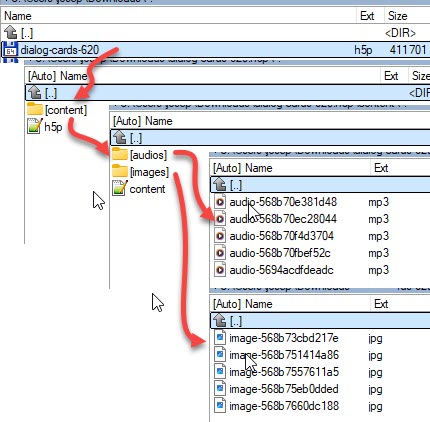
In the CLI development folder on my local computer, the H5P contents that are created reside (for example) in "C:\my_first_h5p_environment\content". Each content looks like this:
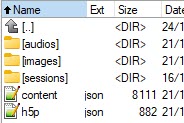
What I want is a CLI command to pack the h5p.json and content.json files and the audio and images folders to a minimal h5p contents zipped file (excluding of the sessions folder which is not needed).
Any ideas anyone?
Joseph 'papi Jo'

otacke
Thu, 12/25/2025 - 23:44
Permalink
The H5P integration for
The H5P integration for Drupal was customized on h5p.test.schulcloud-thueringen.de to not store libraries.
The H5P cli tool does not feature this.
Should be pretty simple though to write yourself a shell script to remove everything from the H5P file that you don't want (even on Windows). Then you could strip the regular file exports.
papi Jo
Wed, 09/09/2026 - 16:19
Permalink
posted a PR on the h5p cli GitHub repo
Add --mini and --output options to export - #201
otacke
Wed, 09/09/2026 - 19:52
Permalink
Yup, noticed. I see any repo
Yup, noticed. I see any repo change. No attention grabbing, please ;-)
papi Jo
Thu, 09/10/2026 - 11:52
Permalink
ok
ok